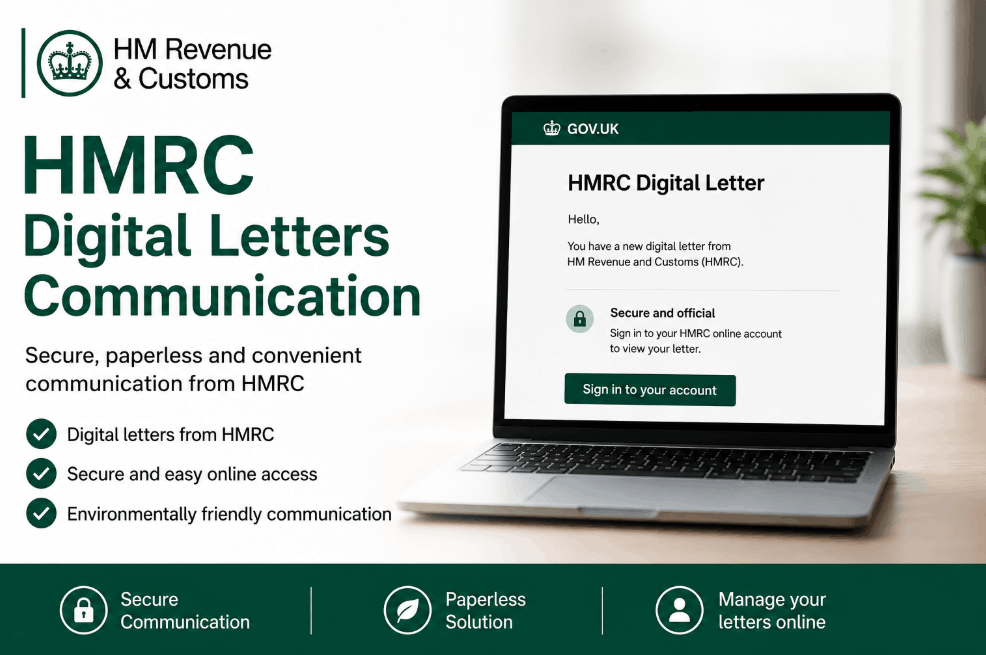
HMRC digital letters communication is the official process where HM Revenue and Customs issues tax notices, alerts, and statutory documents electronically through the Personal or Business Tax Account portals rather than via traditional post.
By 2026, this Digital by Default strategy requires taxpayers to monitor secure digital inboxes for VAT, Self-Assessment, and PAYE updates to ensure full regulatory compliance.
What is HMRC digital letters communication?
HMRC digital letters communication refers to the transition from physical paper notifications to secure electronic messaging within the HMRC app or online portal. Instead of receiving a brown envelope, users get an email or SMS alert stating there is a new message waiting.
The user must then log in via Government Gateway to view the specific tax notice, coding change, or payment reminder.
It is increasingly common for taxpayers to receive HMRC savings account tax letters through this portal, particularly if interest earned on personal holdings exceeds the Personal Savings Allowance.
The shift to paperless tax administration
In practice, the move toward digital-only contact is no longer optional for the majority of UK businesses. As of the 2026/27 tax year, the Department for Work and Pensions (DWP) and HMRC have synchronized systems to ensure that data sharing and communication occur in real-time.
This reduces administrative lag but places a higher burden of notification hygiene on the business owner.
A common pattern observed during this transition is the notification gap, where a business changes its primary contact email but fails to update its Business Tax Account (BTA) settings.
This leads to missed deadlines because HMRC considers a digital letter served once the electronic notification is sent, regardless of whether the recipient opened the email alert.

Why is HMRC moving to digital letters communication in 2026?
The primary driver is the Modernisation of Tax Administration framework. By shifting to electronic formats, the government aims to reduce the environmental impact of millions of printed letters and decrease the multi-million-pound annual postage bill.
However, for the business owner, the benefit lies in the centralisation of records; every piece of correspondence is archived and searchable within the portal.
This transparency is vital as automated data matching becomes more precise; for instance, HMRC warns that savings over £3,501 may incur tax depending on your total annual income and tax band.
Understanding the notification loop
- The Trigger: HMRC generates a notice (e.g., a VAT surcharge or a tax code change).
- The Alert: An automated, non-descript email or SMS is sent to your registered contact point.
- The Access: You log in using Multi-Factor Authentication (MFA).
- The Action: The digital letter is viewed, downloaded, or contested within the portal.
Business Case Example: A small consultancy in Manchester missed a VAT repayment supplement notice because the alert was buried in a Promotions folder. By the time they logged in, the window to provide additional bank details had caused a three-week delay in cash flow.
How to manage HMRC digital letters communication effectively?
To maintain compliance and avoid penalties, businesses must treat their digital tax inbox with the same urgency as their physical mailbox.
- Verify Contact Details: Ensure the email address in your Business Tax Account is monitored by a person, not a generic info@ address that receives high spam volume.
- Download the HMRC App: Use biometric login to check for messages in under 30 seconds.
- Appoint a Digital Agent: Ensure your accountant has View Only or Full Access permissions to see these letters simultaneously.
- Set a Weekly Calendar Reminder: Log in every Friday to check for missed alerts.
- Archive PDF Copies: Download digital letters immediately for your own offline records.
- Update MFA Methods: Ensure backup codes are available if the primary phone used for SMS codes is lost.
- Check Junk Folders: Whitelist official @notifications.service.gov.uk addresses.
- Monitor the Messages Tab: Regularly check both the Messages and Information sections of the portal.
While checking your digital records, you may also find it helpful to clarify personal reporting requirements, such as answering the common question, do I need to declare cash gifts to HMRC UK to avoid future compliance issues.

What are the common HMRC digital letter codes?
When you log into your account, letters are often categorized by specific codes. Understanding these helps you prioritize which ones require an immediate response from your accountant.
| Letter Code | Communication Type | Urgency Level | Action Required |
| P2 | PAYE Tax Code Notice | Medium | Check if tax code is correct for the year. |
| SA302 | Tax Calculation Summary | High | Vital for mortgage or loan applications. |
| IDMS99 | Debt Management Alert | Critical | Immediate payment or contact required. |
| VPCF1 | VAT Penalty Confirmation | High | Review for potential appeal or payment. |
| L6 | Employer Annual Statement | Low | Annual record keeping for PAYE. |
How can you spot a phishing scam involving digital letters?
As HMRC moves away from paper, scammers have pivoted to Digital Letter Alerts. These are highly sophisticated emails designed to look exactly like an official notification. When reviewing decisions on whether to click a link, remember that HMRC has a strict No Links policy for tax-related emails.
The Golden Rules of Digital Verification
A genuine HMRC digital notification will never include a direct link to a login page, a tax refund amount, or a request for credit card details. If an email says, You have a refund of £450.30, click here to claim, it is a 100% certainty that it is fraudulent.
When reviewing digital communication, look for Quishing attempts, these are QR codes included in emails or even hybrid paper letters that lead to fake login portals. Always navigate to GOV.UK manually in your browser rather than following any embedded code or link.
Can businesses opt out of HMRC digital letters communication?
While the government prefers digital, there are provisions for Digitally Excluded individuals. This applies to those who cannot use a computer due to age, disability, remote location (lack of broadband), or religious beliefs.
Ensuring accessibility is a priority, especially regarding sensitive communications like HMRC savings notices for UK pensioners, which may still be issued in paper format upon request.
The Process for Paper Reinstatement
To return to paper communications, you must contact the HMRC helpline and demonstrate that digital access is not reasonably practicable. In practice, most businesses will find this difficult to justify if they are already filing VAT via Making Tax Digital (MTD) software.

Final Summary and Action Plan
The shift to HMRC digital letters communication is a permanent change in the UK’s fiscal landscape.
To protect your business, you should immediately verify your contact email in the Government Gateway, enable the HMRC app for real-time alerts, and establish a monthly Digital Audit with your tax advisor. Staying proactive ensures that a missed notification doesn’t turn into a costly penalty.
FAQ
Does HMRC still send paper letters in 2026?
HMRC continues to send some physical letters, especially for legal debt proceedings or where a digital notification has bounced. However, the default for most registered businesses is now paperless.
How do I view my digital letters from HMRC?
Log into your Business Tax Account or Personal Tax Account via GOV.UK. Navigate to the ‘Messages’ section or use the HMRC app to view your secure communications.
Will HMRC email me about a tax refund?
HMRC may email you to say there is a message in your account, but they will never state the refund amount or include a link to claim it within the email.
Can my accountant see my digital letters?
Yes, provided you have authorized them as your Agent for that specific tax regime (e.g., VAT or Self-Assessment) through the digital authorization service.
What should I do if I miss a digital notification?
If a deadline is missed due to a notification failure, you may have Reasonable Excuse for an appeal, but you must prove that the failure was on HMRC’s technical side.
How long does HMRC store digital letters online?
Most digital correspondence remains accessible in your account for 3 to 7 years, depending on the tax type, though it is best to download PDF copies.
Is the HMRC app safe for viewing letters?
Yes, the app uses 256-bit encryption and biometric security (FaceID/Fingerprint), making it safer than receiving paper mail in a shared building or via standard email.