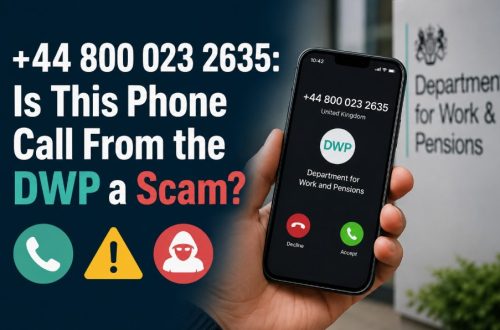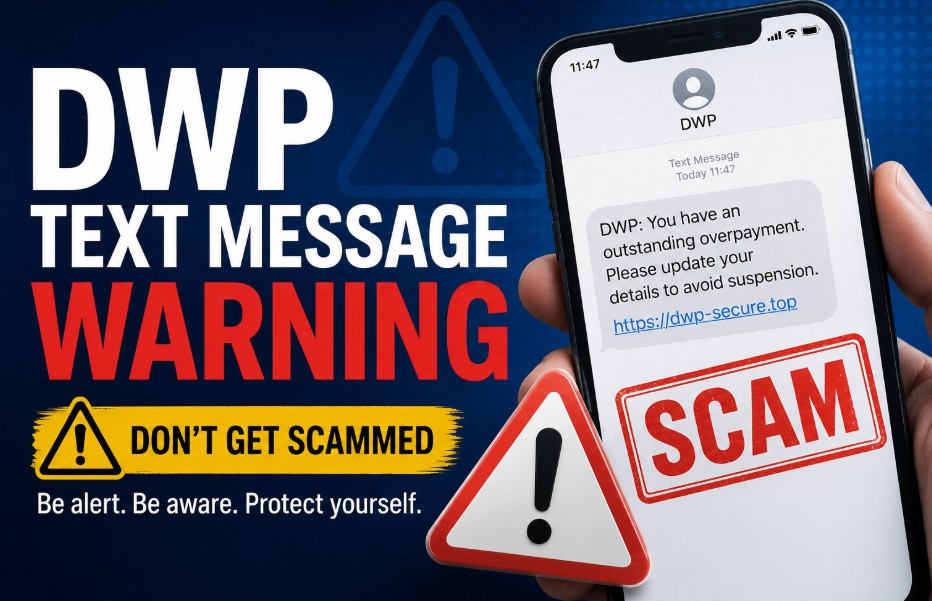
Receiving a DWP text message warning can be an unsettling experience, especially with the rise of sophisticated mobile scams. While the Department for Work and Pensions does use SMS for routine updates, they never request passwords or bank details.
Understanding these official communication patterns is essential for all UK benefit claimants in 2026.
What is a DWP Text Message Warning?
A DWP text message warning is an official SMS alert sent by the UK Department for Work and Pensions to update claimants about appointments or changes to their Universal Credit journal. However, if the text requests bank details, PINs, or contains an immediate threat of benefit suspension via a web link, it is a fraudulent phishing scam.
They are strictly functional and never include requests for sensitive financial credentials, passwords, or direct payments. Any communication demanding immediate urgent action under threat of benefit suspension is fundamentally inconsistent with legitimate government notification procedures.
The DWP will never ask you to provide banking details, PINs, or passwords via text message. Any communication demanding immediate payment or threatening benefit suspension via an SMS link is a fraudulent attempt to compromise your personal information.
To understand how the department genuinely interacts with claimant financial accounts under current legislation, review the latest DWP Pension Bank Rules Update to ensure you are relying on official regulatory frameworks rather than text-based misinformation.
Does the DWP Send Text Messages to Benefit Claimants?
Yes, the Department for Work and Pensions (DWP) does send legitimate text messages to benefit claimants.
However, official texts are strictly automated, non-urgent notifications regarding claims, job centre updates, or appointment schedules, and they never demand direct banking verification or payment transfers through text links.
Why Do You Receive Text Messages from the DWP?
The DWP sends text messages to provide real-time informational updates and alerts regarding your current benefit claim status.
These automated messages are designed exclusively to prompt you to log into your official, secure Universal Credit account or the GOV.UK gateway to take further action safely.
- Provide timely reminders for scheduled appointments.
- Notify claimants that new information has been added to their Universal Credit Journal.
- Confirm that evidence submitted by the claimant has been received.
These messages are designed to direct you to your secure online portal or the official GOV.UK gateway, not to facilitate transactions or resolve sensitive issues directly via SMS.
How Do the DWP Officially Communicate with Claimants?
The DWP communicates with claimants through secure channels, including the official Universal Credit online portal, physical postal letters, and brief automated text or email alerts.
Official communication always prioritises directing you to log into your secure online account independently rather than requesting actions within an SMS link. Legitimate government agencies prioritise security over convenience.
While the DWP sends automated alerts, these messages are designed to direct you to your secure online portal, your Universal Credit Journal or the official GOV.UK gateway, rather than facilitating transactions directly through an SMS link.
If you receive an unexpected message, treat it as unverified until you access your account through an independent, official channel.
What Does a Genuine DWP Text Message Warning Look Like?
A genuine DWP text message looks concise, neutral, and administrative in tone. It typically displays a sender ID of DWP or a verified government shortcode, references a specific appointment date or claim, and contains no links requesting personal sign-in credentials, bank accounts, or financial payments.
- Official SMS: Typically displays DWP or a recognised government shortcode as the sender ID. They will reference your specific claim or an upcoming appointment.
- Scam/Phishing SMS: Often arrives from a random mobile number or a sender ID spoofing GOV-UK. They frequently use shortened URLs (like bit.ly) and create a sense of false urgency, such as claiming your account is suspended.
DWP Text Message Warning iPhone and Android Security Indicators
Smartphone users often face unique security challenges when identifying phishing attempts. Scammers frequently mask their sender ID, but specific technical red flags often reveal the true nature of the message.
| Feature | Official DWP SMS | Scam/Phishing SMS |
| Sender ID | Often displays DWP or a recognised government shortcode. | Random mobile numbers or disguised as GOV-UK. |
| Link Content | Links usually direct to ‘gov.uk’ or your specific benefit portal. | Links use shortened URLs (bit.ly, t.co) or suspicious domains. |
| Tone | Factual, neutral, and administrative. | High urgency, threatening tone, or demanding payment. |
| Content | Mentions your specific claim or upcoming appointment. | Generic: Your account is suspended or final warning. |
Steps to Verify a Genuine Message
- Check your official portal: Log in to your Universal Credit Journal or government gateway directly through your browser, not by clicking the text link.
- Verify the sender: Check if the message is part of a previous, verified conversation thread.
- Review the request: Ask if the DWP would realistically ask for this information via text, they never ask for banking details or PINs.
- Examine the URL: Inspect the link text carefully for misspellings (e.g., govuk.com instead of gov.uk).
- Ignore urgent demands: Official notifications rarely require an immediate, high-pressure reaction via SMS.
- Contact directly: If in doubt, call the official number provided on your previous paper correspondence.
- Do not reply: Sending a response, even a refusal, confirms your number is active to the scammer.
How to Report Suspicious Messages?
If you receive a suspicious message, the most effective response is to report it via the standard UK security channels. The 7726 service, managed by mobile network operators, allows the industry to track and block malicious infrastructure.
Recommended Actions for Mobile Security
- Forward to 7726: Copy the message and forward it to 7726 (spells ‘SPAM’). This is free of charge and helps your provider block the originating source for all users.
- Report to Action Fraud: If you have been targeted, report the incident to the official national reporting centre for fraud and cybercrime.
- Use built-in reporting: On iPhones, tap Report Junk if the option appears under the message.
- Block the number: Utilise the Block this Caller feature in your phone settings to prevent further contact from that specific source.
Identifying the Signs of Smishing
- Inconsistent Sender IDs: Official bodies generally use consistent, verified alphanumeric sender IDs.
- Financial Urgency: Scammers rely on the psychological impact of impending financial loss to force errors.
- Grammatical Discrepancies: While some scams are professional, many still feature subtle spelling or grammatical errors that official communications avoid.
Why Scammers Target Benefit Claimants?
Criminals target these specific groups because the loss of benefit payments creates extreme stress, which lowers the victim’s natural hesitation to click suspicious links. They leverage this anxiety, knowing that a final warning regarding a benefit payment is a powerful motivator for immediate, unverified action.
Summary and Next Steps
If you receive a DWP text message warning, do not panic. The safest course of action is to ignore any included links and verify your claim status by logging into your official account directly.
By using the 7726 reporting service and remaining vigilant against high-pressure tactics, you can secure your personal information against phishing attempts.
FAQ about DWP Text Message Warning
Do DWP send text messages on iPhone?
Yes, the DWP sends automated texts that appear on iPhone devices just like any other SMS. They do not have a dedicated iPhone-only messaging system, and they appear in your standard Messages app.
Will DWP text me about the Winter Fuel Allowance?
No. The DWP does not use text messages to notify claimants regarding specific benefit entitlements like the Winter Fuel Allowance. Such information is communicated via official letters.
Can a scammer hack my phone through a text?
Simply receiving a text cannot hack your phone. However, clicking a link can lead you to a site that installs malware or captures your login credentials, effectively compromising your security.
Does texting 7726 do anything?
Yes. Texting 7726 notifies your mobile provider that the number is sending spam. This helps them identify and block the scammer’s infrastructure, protecting other users from the same message.
What is the DWP text message number?
There is no single magic number. The DWP uses various shortcodes. Because numbers can be spoofed, never rely on the sender number alone to verify authenticity. Always cross-reference with your online journal.
What happens if I forward a text to 7726?
Your mobile operator receives the message, analyses the content and the sender’s number, and adds it to their threat intelligence database to block similar messages across their network.