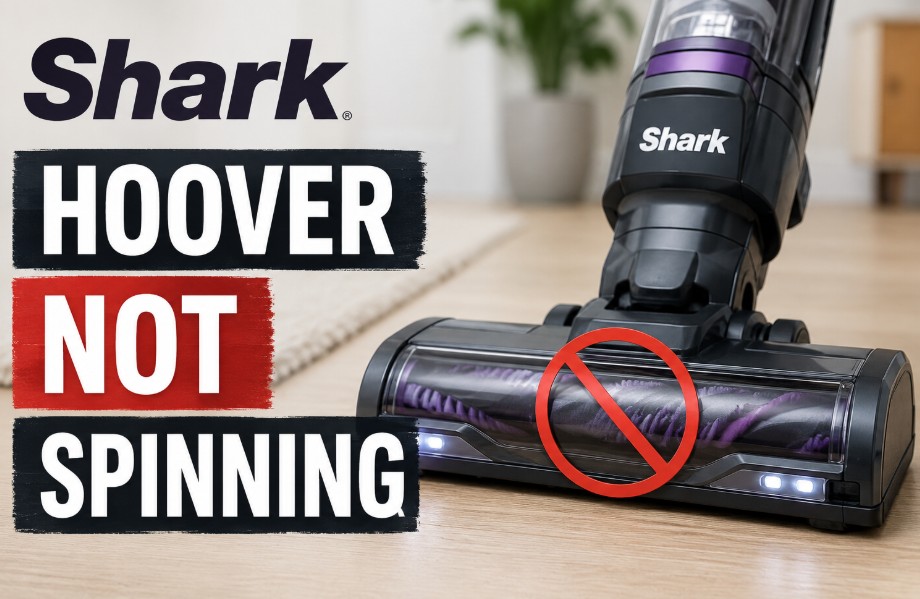
A Shark Hoover not spinning typically because of a tripped thermal cut-out switch, heavy hair wrapped around the roller bearings, or a loose electrical pin connection between the lift-away pod and floor nozzle.
Unplugging the unit for 60 minutes to allow the thermostat to reset, cutting away tangled hair debris, and reclining the handle past a 45-degree angle will usually restore immediate rotational power.
Why is my Shark Hoover not spinning?
When a Shark Hoover brush bar refuses to turn, it is caused by one of three things: an internal electrical safety shut-off, an active physical blockage jamming the mechanism, or a mechanical failure within the internal drive system.
Tripped Thermal Cut-Out Switch
Shark vacuums feature an internal solid-state thermostat. This component actively protects your machine from permanent motor burnout. If the brush roll encounters a sudden blockage or excessive structural drag, the motor draws too much power and causes a sharp voltage spike.
The control board reacts instantly. It cuts electricity to the floor head before the internal components can overheat or melt.
Severe Hair Wrap and Bearing Resistance
Hair wrap happens over time. Even on models equipped with Anti-Hair Wrap tech, long threads, thick carpet fibres, and fine pet hair can migrate laterally. This debris packs tightly into the small gaps around the drive spindles and plastic end-caps.
Once this material compresses around the roller bearings, it creates intense torque resistance. The brush bar simply cannot spin freely against that level of friction.
Standing Upright Safety Lock
Shark floor heads feature a built-in mechanical safety switch near the neck hinge. If your vacuum remains locked in a perfectly upright, vertical position (at a 90-degree angle), the brush bars are engineered to stay completely stationary.
This preventative design prevents the rotating brushes from friction-scorching your carpet while the machine is idle.
Faulty Electrical Joint Interfaces
Power travels from the main motor pod down through the extension wand to the lower nozzle via internal metal contact pins. Over time, these male and female connection terminals can collect fine structural dust, become bent, or loosen.
When the quick-release joints sustain physical wear, the electronic continuity is broken, resulting in a completely dead floor head with no lights active.
Broken Internal Drive Belt
Inside the sealed floor nozzle housing, a thick, cogged rubber belt transfers torque from the internal nozzle motor to the brush roll cylinder. If this belt cracks, stretches, or snaps entirely, the motor will whine loudly or hum, but the brush bar will remain stagnant while the indicator light stays green.
Battery Power Management Firmware
On lightweight cordless models (like the Shark Detect Pro), the internal firmware prioritises essential suction over motor-driven components.
If your lithium-ion battery charge drops below 20%, the system automatically cuts off power transmission to the power-hungry floor nozzle to preserve basic run-time.
How to Troubleshoot a Shark Hoover Not Spinning?
To troubleshoot a Shark Hoover that is not spinning, recline the handle past 45 degrees, read the nozzle diagnostic light, isolate the machine from the UK mains power socket, clear any hair wrapped tightly around the end bearings, and perform a 60-minute thermal reset.
If your brush roll has stopped rotating, follow this structured diagnostics process to safely isolate and fix the issue.
- Check the handle recline angle: Ensure the vacuum is not locked upright. Firmly place your foot on the floor nozzle and pull the handle backwards past a 45-degree angle. This engages the internal micro-switch and sends electrical current to the brushes.
- Inspect the floor nozzle indicator light: Turn on the power and look at the LED indicator light on the base.
- Solid Red: A direct mechanical jam. Turn off power immediately.
- Flashing Red: The thermal circuit has tripped due to overheating.
- No Light / Dead: A complete loss of electrical current across the connection joints.
- Execute a manual power cycle and clear debris: Turn off the power and completely unplug the unit from the mains socket (or remove the battery pack). Flip the floor head over and use a pair of scissors or long-nosed pliers to cut away tightly wound strings, hair, or debris tightly compressed around the side drive spindles and bearings.
- Clean the dual-roller assembly (DuoClean models): Slide the release tabs to remove the brush garage cover. Pop out the soft front roller using the toggle on the right side. Clean out any compacted debris hidden behind the roller and inside the exposed left-side gear teeth.
- Clean the electrical contact pins: Separate the floor nozzle, multi-flex wand, and main lift-away pod. Locate the silver male prongs and matching female sockets within the plastic joints. Wipe away fine dust with a dry microfiber cloth and verify that none of the prongs is bent out of alignment.
- Perform a complete thermal reset: Leave the vacuum completely disconnected and idle for a minimum of 60 minutes. This gives the internal solid-state protective thermostat adequate time to cool down and automatically reset its circuitry.
- Reassemble and test: Firmly click all wands and sections back together until they lock. Reattach the power source, recline the handle to a cleaning angle, and activate the unit to confirm that the brush bars rotate with a solid green light status.
What do the floor nozzle indicator lights mean on a Shark Hoover?
The LED indicator light located on the front or side of the floor nozzle serves as a built-in diagnostic tool. Understanding the specific light patterns allows you to quickly pinpoint whether the failure is electronic, mechanical, or thermal.
| Indicator Light Status | Identified Mechanical or Electrical Fault | Immediate Corrective Action Required |
| Solid Green | Electrical continuity is perfect; brush roll is clear. | Recline the handle and check for minor belt slippage. |
| Solid Red | Severe physical obstruction or jammed brush bar. | Disconnect power and clear hair or debris from bearings. |
| Flashing Red | Floor nozzle motor has overheated and tripped. | Turn off unit, unplug, and allow 60 minutes to cool down. |
| Flashing White | Electronic communication error across models. | Disconnect wand and clean internal terminal connection pins. |
| No Light / Dead | Complete open circuit; no power reaching nozzle. | Inspect handle micro-switch and check the main fuse. |
Where is the brush bar reset button on my Shark vacuum?
Shark vacuum cleaners do not have a physical, manual brush bar reset button. Instead, the electrical system relies entirely on an automated, internal solid-state thermal protective thermostat built directly into the main circuit board.
To force a full system reset on both corded uprights and cordless models, you must execute a manual power cycle:
- Turn off the power switch completely and disconnect the main three-pin plug from the UK mains socket (or remove the lithium-ion battery pack if using a cordless model).
- Inspect the floor nozzle thoroughly, cutting away any thread, carpet fibres, or debris restricting the rollers.
- Check the clear plastic lower ducting hose on the floor head for hidden blocks.
- Leave the entire vacuum cleaner completely disconnected and idle for a minimum of 60 minutes.
- Reattach the wand, pod, and battery, plug the unit back into the wall, and recline the handle to test the rollers.
Why does a Shark vacuum roller brush start then stop?
A Shark vacuum roller brush starts then stops when the control board detects an instantaneous electrical current spike caused by hidden hair friction inside the end-caps or from a sudden air seal change on thick, plush carpets.
A secondary cause involves abrupt transitions in floor surfaces. When moving from low-pile hard floors to dense plush carpets, the sudden friction increase can trip the delicate resistance thresholds on smart sensors.
This issue is highly prevalent on high-suction settings where the floor head effectively seals itself against the carpet fibres, stopping the brush roll from rotating freely.
Why is my Shark Hoover not spinning with no light active?
A Shark hoover with no spinning brush and no active indicator lights means there is a total breakdown in electrical current flow, typically caused by loose wand clips, dirty metal prongs, or a faulty handle micro-switch.
The primary culprit is a dirty, bent, or misaligned connection terminal. The metal contact pins located inside the locking joints of the multi-flex wand can easily build up a layer of structural dust or become loose over time.
When reviewing repair decisions on older machines, a common pattern is that the quick-release mechanism has sustained minor physical wear, preventing the male and female electrical terminals from seating together perfectly when the vacuum is clicked back into place.
How do you troubleshoot the Stratos, Detect Pro, and NZ850UK models?
Troubleshooting generation-specific Shark vacuums requires distinct approaches: clear the electronic sensor matrix on the Shark Stratos, charge the battery past 20% on the Detect Pro, or open the suction release valve on the corded NZ850UK.
Different generations of Shark vacuums present unique engineering quirks that cause the brush roll to stop turning.
Shark Stratos Troubleshooting
The Stratos range features advanced electronic floor recognition algorithms alongside Anti-Hair Wrap Plus technology. If the brush roll stops, it is frequently due to the electronic sensor matrix becoming coated in ultra-fine dust, misinterpreting floor resistance.
Wipe down the underside sensors with a dry microfibre cloth and ensure the slider switch on the handle is set to the correct pile depth rather than maximum suction.
Shark Detect Pro Not Spinning
The lightweight Detect Pro relies on automated power scaling. If the battery charge drops below 20%, the firmware systematically cuts power to the power-hungry floor nozzle motor to preserve basic suction.
Check the LED display panel; if the battery icon is flashing or low, the brush bar will refuse to spin until the unit is fully recharged on its dock.
Shark NZ850UK Brush Not Spinning
As a heavy-duty corded UK upright model, the NZ850UK is subject to massive structural airflow pressures. If the brush bar fails, check the small suction release valve on the handle.
If closed completely on deep-pile carpets, the immense vacuum seal anchors the brush bar to the floor, stopping rotation. Opening the airflow valve slightly drops the vacuum seal and lets the brush bar spin at full speed.
When do you need a Shark micro switch replacement or new belt?
You need a Shark internal drive belt replacement if the head emits a burnt rubber smell and the motor whines loudly, while a new handle micro-switch is required if the base lights fail exclusively during handle recline angles.
Testing the Internal Belt and Micro-Switch
| Component | Common Sign of Failure | Definitive Diagnostic Check |
| Internal Drive Belt | Smells like burnt rubber; motor whines loudly while the roller spins freely by hand with no resistance. | Remove the lower plastic cover screws to inspect for a snapped, cracked, or stretched rubber belt. |
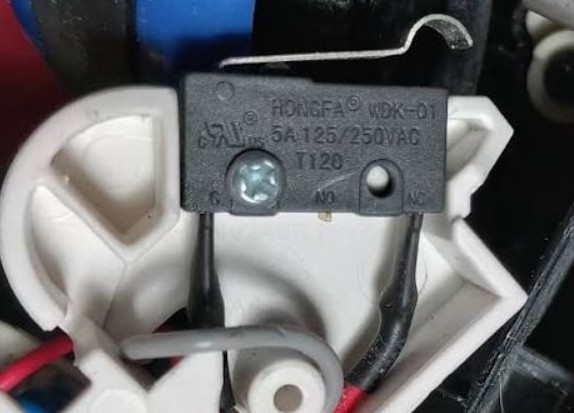
| Handle Micro-Switch | No lights on base; brush roll refuses to spin only when the handle is reclined, but works intermittently when shaken. | Use a multimeter to test for electrical continuity across the switch terminals when the hinge is bent. |
| Terminal Connection Pins | Intermittent power loss when angling or turning the vacuum handle during normal use. | Inspect for bent male prongs or loose plastic housing sleeves inside the wand connection joints. |
Replacing a broken internal drive belt or a faulty micro-switch requires removing the security Torx screws hidden beneath the small front rubber wheels on the underside of the floor nozzle.
If your machine is out of its warranty period, high-quality replacement micro-switches and heavy-duty belts are easily sourced from independent UK appliance parts distributors.
Summary
To keep your Shark hoover operating efficiently and prevent brush roll failures, establish a regular monthly maintenance routine.
Always verify that the connection terminals along the extension wand are free of dust buildup, and use the quick-release hatches to clear away hidden debris packed around the roller bearings.
If the unit cuts out due to overheating, remember to allow a full hour for the internal thermal thermostat to reset before attempting to resume cleaning.
FAQ
Why won’t my brushes turn on my Shark Hoover when it is standing up?
Shark vacuums feature an integrated mechanical safety switch inside the neck hinge. The brush roll will never spin while the machine is locked in a perfectly upright, vertical position to prevent friction damage to your carpets.
Can a broken belt cause a Shark brush roll to stop turning?
Yes, if the internal cogged drive belt snaps or stretches, the motor cannot transfer rotational torque to the brush roll. The indicator light will often remain green, but the bar will stay completely still.
Why is my Shark Hoover not spinning after cleaning the rollers?
This occurs if the rollers were reinserted while still damp, triggering the moisture protection circuit, or if the male connection pins along the extension wand were accidentally misaligned during reassembly.
Does the Shark Anti-Hair Wrap feature prevent all structural jams?
No, while it actively minimises hair wrap on the main cylinder, long threads, thin wires, and pet hair can still migrate laterally and tightly compress around the internal drive bearings.
What is the average lifespan of a modern Shark vacuum cleaner?
With regular filter cleanings and prompt blockage removals, a standard Shark vacuum cleaner offers an average reliable operational lifespan of 5 to 7 years within a typical UK household.
Is it worth repairing a Shark vacuum floor nozzle out of warranty?
If the issue is a simple broken belt or a misaligned pin connection, a DIY repair costs under £10. However, if the internal nozzle motor has shorted, a full replacement floor head assembly is usually required.
Why does my Shark vacuum have a solid red light on the base?
A solid red light indicates a direct mechanical jam. Turn off the power immediately and check for a foreign object, such as a sock, small toy, or thick rug fringe, wedged inside the intake.